
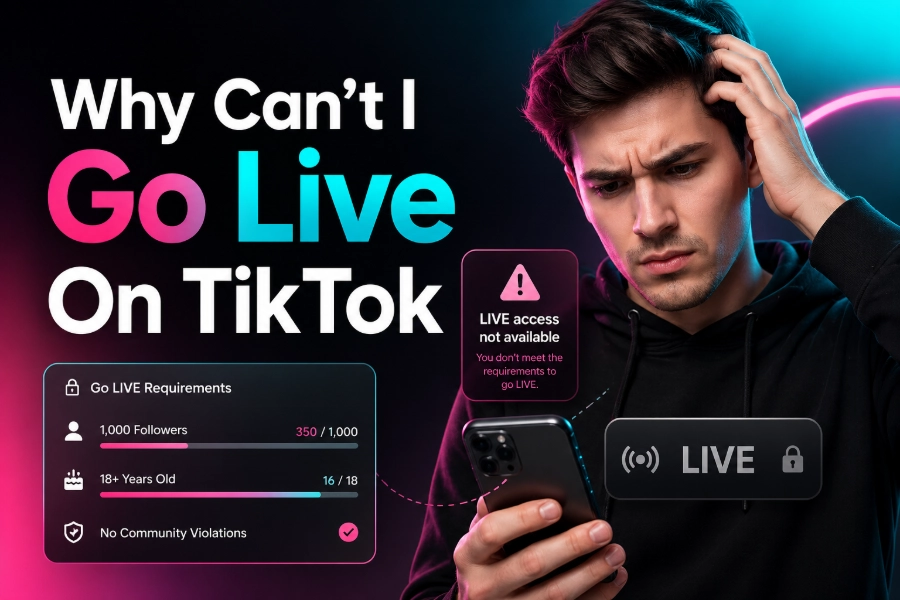
TikTok has become one of the most popular platforms for live streaming, but many users face challenges when trying to go live. If you’re wondering why can’t I go live on TikTok, this article will explain the common reasons behind the issue and provide actionable solutions.
Whether you’re trying to reach a broader audience or engage with your followers in real-time, going live is an excellent way to make the most of TikTok’s dynamic features. However, several factors can prevent you from starting a live stream on this platform. Let’s dive into the possible causes and how you can overcome them.
The Requirements for Going Live on TikTok
To go live on TikTok, there are specific requirements that users need to meet. The primary condition is that you need to have at least 1,000 followers. This threshold ensures that you have a sufficient audience to make your live stream worthwhile. Additionally, users must be 18 years or older to access the live streaming feature. If you don’t meet these basic criteria, you won’t be able to see the “Go Live” button on your TikTok profile.
If you’re eligible and still facing issues, you might want to check your account settings. Sometimes, issues such as account restrictions or updates to TikTok’s guidelines can impact your ability to stream. To improve your chances of going live successfully, consider regularly posting engaging content and growing your follower base.
For those interested in tracking their TikTok performance, Pro TikTok Viewer can help you monitor account statistics, follower engagement, and more.
Common Issues That Prevent You from Going Live
There are various reasons why you might be unable to access TikTok’s live feature, and understanding these issues can help resolve them quickly. Here are some of the most common causes:
1. Account Restrictions or Violations
TikTok enforces strict community guidelines, and violating these can lead to temporary or permanent restrictions on your account. This can prevent you from accessing certain features, including live streaming. If your account is under review, or if it has faced any penalty, you may need to wait for it to be lifted.
2. Insufficient Followers
As mentioned earlier, you need to have at least 1,000 followers to unlock the live streaming feature. If you haven’t hit this milestone yet, you’ll need to focus on growing your following before being able to go live.
3. App Glitches or Technical Issues
Sometimes, the issue might not be related to your account or follower count but rather a temporary glitch in the app itself. Ensure your TikTok app is updated to the latest version to avoid such issues. You can also try reinstalling the app or logging in from another device to check if the problem persists.
For users experiencing technical challenges while going live, consider using tools like TikTok Data Viewer to check your account’s performance and identify any underlying issues that might affect streaming.
Troubleshooting Solutions to Fix the Issue
If you’re still unable to go live on TikTok despite meeting all the necessary requirements, here are some troubleshooting steps to help resolve the problem.
1. Check Your Age and Country
If you’re under 18 years old or living in a country where TikTok’s live feature is restricted, you won’t be able to go live. TikTok has regional restrictions, so it’s important to verify that you meet both the age and geographic requirements.
2. Update Your App
Always ensure that your TikTok app is up to date. An outdated version of the app may cause functionality issues, including live-streaming problems. Go to the app store and check if there’s an update available for TikTok.
3. Log Out and Re-Login
Try logging out of your account and then logging back in. This simple step can sometimes resolve technical glitches preventing you from accessing the live feature.
For better tracking and insights into your TikTok activities, the TikTok URL Viewer can be a helpful tool for viewing and analyzing profiles without restrictions.
4. Contact TikTok Support
If none of the above solutions work, reaching out to TikTok’s support team is a good next step. Provide them with details about the issue you’re facing, and they may be able to resolve it or provide more specific guidance.
Why Your Live Stream May Fail to Start
Even after ensuring that everything is in order, you may still encounter issues when trying to go live. Here are some reasons why your stream might fail to start:
1. Poor Internet Connection
A weak internet connection can cause your live stream to fail. TikTok requires a stable internet connection for live streaming, so ensure you have reliable Wi-Fi or mobile data before starting.
2. Overloaded TikTok Servers
At times, TikTok’s servers might be overwhelmed with too many users trying to stream at once. During such high-traffic periods, you may face difficulties in starting your live session. Patience is key during these times.
3. Camera or Microphone Issues
Ensure that your camera and microphone are functioning correctly. If there is an issue with the device’s camera or audio setup, your live stream may not be able to start properly.
What to Do If You Can’t See the “Go Live” Button
In some cases, even when you’re eligible to go live, you may not see the “Go Live” button. Here are a few things to check:
- Reinstall the App: Try reinstalling TikTok to see if the feature appears.
- Clear Cache: Clearing the cache in your app’s settings may also help solve this issue.
- Test with Another Account: If possible, log into another TikTok account to see if the live button is visible there.
These solutions can help resolve the issue and ensure that you can stream without any interruptions.
Other Features to Enhance Your TikTok Live Experience
If you’re looking to take your TikTok live streams to the next level, there are several tools and tips to enhance your broadcasts. From filters and effects to adding interactivity with your audience, TikTok provides a wide range of options for engaging your followers during live streams.
One way to analyze your audience’s behavior is by using the TikTok Page Viewer tool, which helps track interactions with your TikTok page. It’s a valuable resource for streamers looking to improve their content strategy.
Conclusion
If you’re still asking why can’t I go live on TikTok, it’s likely due to one of the common issues mentioned above. By following the troubleshooting steps outlined in this article, you should be able to resolve the problem and begin live streaming on TikTok.
Remember, the most important factors for going live are meeting the follower and age requirements, as well as having a stable internet connection. If you encounter any technical issues, TikTok’s support team is always available to assist. With the right approach, you’ll be able to start live streaming and engage with your TikTok audience in no time.
FAQs
Why can’t I go live on TikTok?
If you’re unable to go live on TikTok, ensure you meet the age and follower requirements (at least 1,000 followers). Account restrictions or app glitches may also prevent access. Try updating the app or contacting support for help.
What is the minimum follower count to go live on TikTok?
You must have at least 1,000 followers to access TikTok’s live streaming feature. Without this minimum follower count, the option to go live will be unavailable. Focus on growing your followers through engaging content to unlock this feature.
Can I go live on TikTok if I’m under 18?
No, TikTok requires users to be at least 18 years old to use the live feature. If you’re under 18, you’ll need to wait until you reach the age requirement to access TikTok live streaming.
Why is the “Go Live” button not showing on TikTok?
If the “Go Live” button isn’t visible, ensure you’ve met the follower and age requirements. You might also be experiencing app glitches or restrictions. Check for updates or reinstall the app to fix the issue.
How do I fix technical issues when going live on TikTok?
Technical issues, like poor internet or camera problems, can affect your TikTok live stream. Ensure you have a stable internet connection and that your camera and microphone are working properly. Restart the app if needed.
What should I do if TikTok says my account is restricted?
If your account is restricted, it may be due to a violation of TikTok’s community guidelines. You may need to wait for the restriction to lift. Check TikTok’s support page for more information on how to resolve the issue.
Can TikTok block me from going live for violating community guidelines?
Yes, violating TikTok’s community guidelines can result in a ban or restriction from using live streaming. Avoid actions such as harassment, spamming, or posting inappropriate content to prevent being blocked from this feature.
Why can’t I stream in certain countries?
TikTok’s live feature is unavailable in some countries due to regional restrictions or regulatory requirements. If you’re in a restricted region, the live feature may not be accessible. Check local guidelines to verify availability.
How can I check if my TikTok account meets the live streaming requirements?
You can check your eligibility by visiting your TikTok profile. If you have 1,000 followers and are over 18, the “Go Live” button should appear. If it’s still unavailable, consider contacting TikTok support for clarification.
How do I contact TikTok support about live streaming issues?
If you’re experiencing issues going live, contact TikTok support through the app. Go to your profile, tap on “Settings,” and then select “Report a Problem” under the “Support” section. Provide details about the issue you’re facing.